No. JobOps is a job application tracker for the person applying. It helps you manage your own roles, documents, employer replies, and interview progress. It is not an employer’s system for screening candidates.
Know where every job application stands.
Keep interview stages, notes, documents, and employer replies attached to the right role. When a recruiter calls, you can find the application instead of reconstructing it from your inbox.
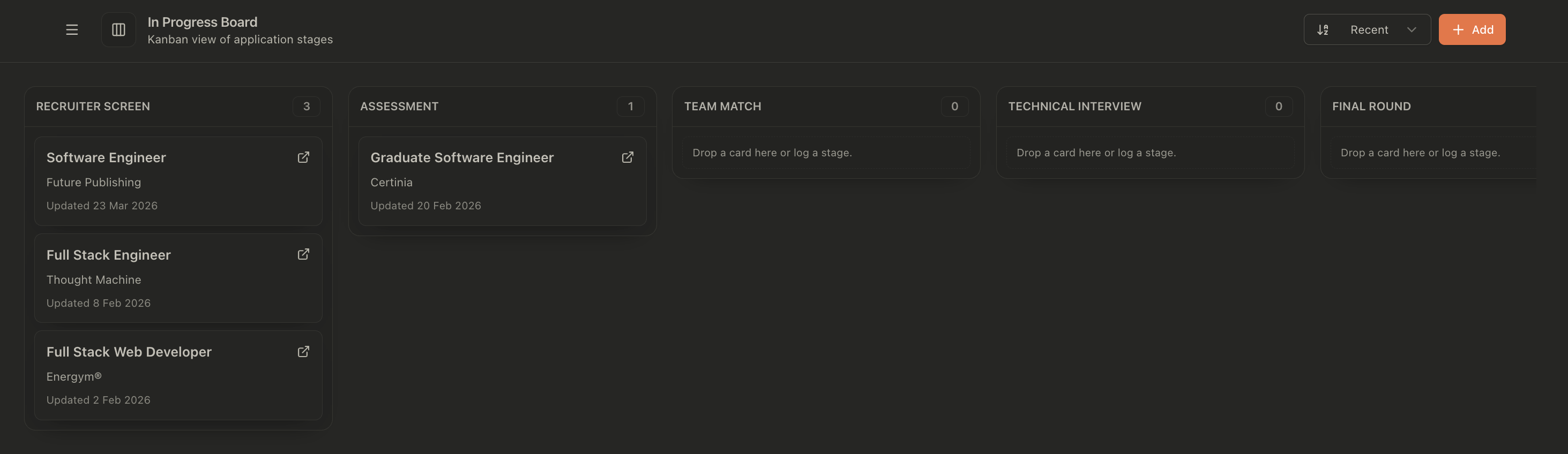
A saved job and a sent application are different things.
A bookmark says you found an opening. It does not tell you whether you applied, which resume you used, or whether the employer asked you to book a call.
JobOps keeps those steps with the role. You can review discovered jobs, prepare an application, mark it applied after submitting, and track interview progress on the board. The record follows the opportunity as the process changes.
Keep the opening
Save the company, title, job description, and application link. Check that the description contains the responsibilities and requirements you will need later.
Record what you sent
Keep the resume and application context with the job. Mark the application after you submit it so prepared documents do not get mistaken for a completed application.
Update the actual stage
Move the role when the process changes. Add a note about the conversation, the task you received, or the next action you agreed with the recruiter.
The context belongs with the application.
Job listings disappear. Interview invitations use abbreviations. A recruiter might refer to an opening by a different title. A useful application record preserves enough context to connect those pieces.
The job view brings the saved description, resume document, notes, and timeline together. Open the record before a call and you can review what the role asked for and what has happened since you applied.
Use notes for details you will want back: the team’s priorities, interview topics, questions you still have, and the next step. “Assessment sent; return by Thursday” is more useful than “good call”.
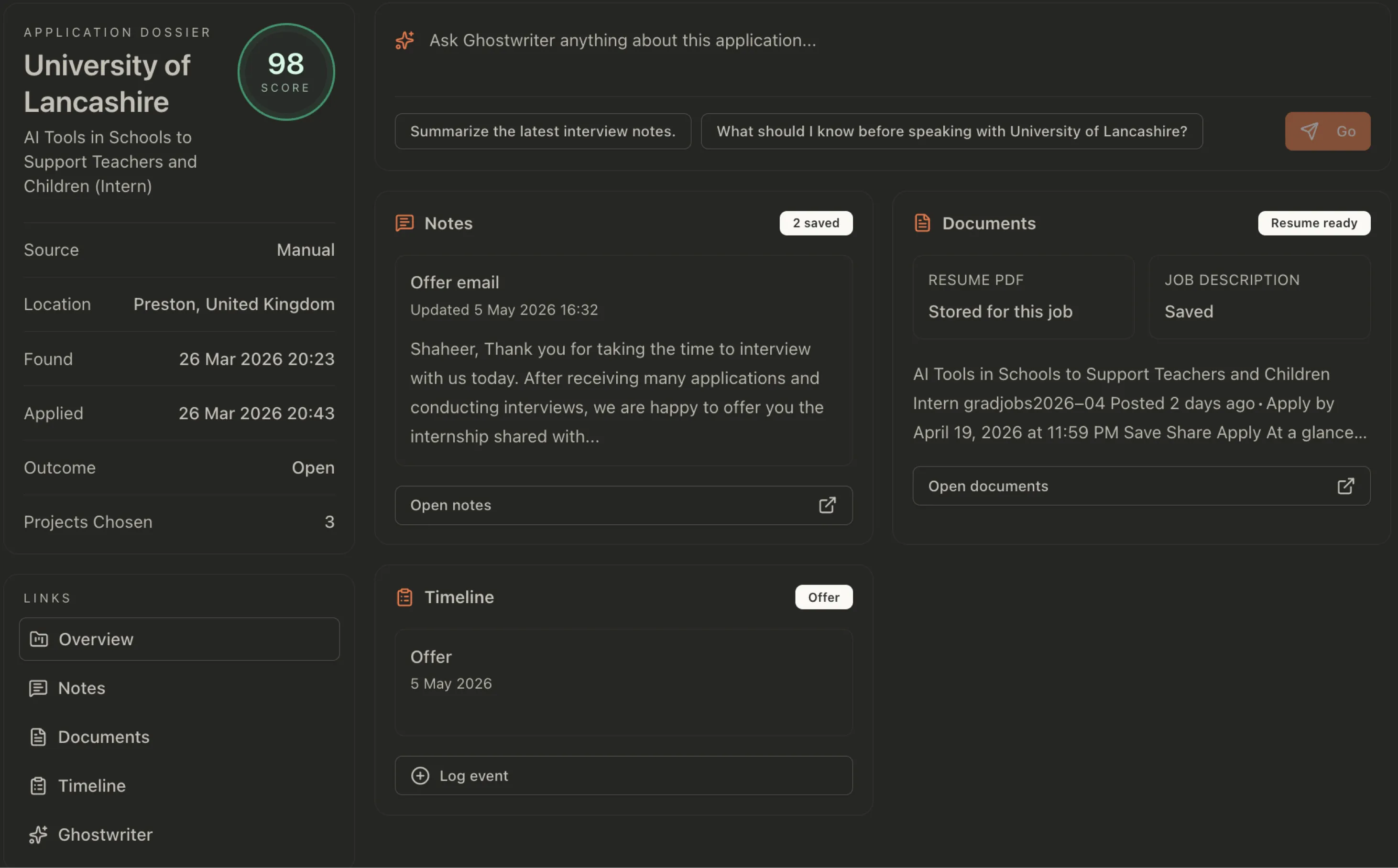
Bring employer replies back to the right role.
An application confirmation, an assessment invitation, and a rejection all arrive in the same inbox. They mean different things for your pipeline.
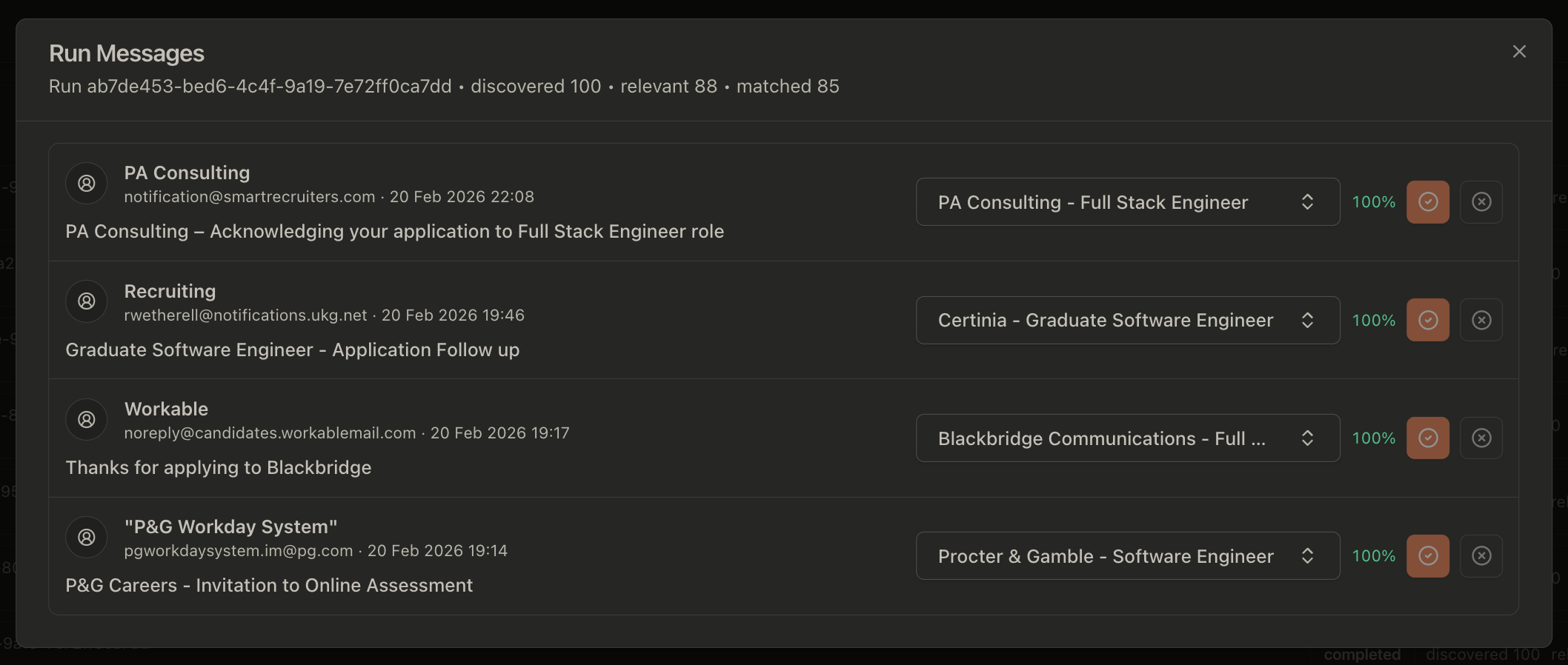
With Gmail connected, JobOps can find job-related messages and match them to applications. The message review shows the email subject, proposed role, and matching confidence, with controls to review the association.
Read the message before acting on it. A confirmation means the application was received; it does not mean an interview has been offered. If you have several applications at one employer, check the role title carefully.
A short review keeps the board useful.
Set aside a regular slot to review active applications. Start with interviews and assessments, then look at applications waiting for a response. Check what needs action against the employer’s last message.
The board’s update dates help you spot records worth checking. Time alone does not tell you the outcome: a quiet week might mean a slow process, a missed message, or no decision yet.
Close out roles when you have a confirmed outcome or decide to stop pursuing them. Keep the notes so you do not have to rediscover why an opening was a poor fit.
When you need new opportunities, run a search across your chosen boards. Give the current pipeline a review before adding another batch.
Questions to answer for each active role
- What was the last confirmed event?
- Am I waiting on the employer, or is the employer waiting on me?
- Did they give a date or a deadline?
- What do I need to prepare before the next conversation?
- Do I still want this role given what I have learned?
When does a spreadsheet stop being enough?
A spreadsheet works well if you want a company, a link, a date, and a status. It is easy to customise and may be all you need for a small search.
The extra work starts when each row points to a document folder, an email thread, a lost job description, and notes stored somewhere else. You are maintaining the connections yourself.
JobOps is useful when you want the record and its context together, particularly across several interview processes. You can also prepare role-specific resume content within the same job search workflow.
FAQ
A few details before you start
No. You can keep your application records, notes, and stages up to date yourself. Connecting Gmail adds a way to find job-related messages and associate replies with applications.
Yes. Messages can be ambiguous, especially when you have applied to several jobs at the same employer. Review the matched role and the message before relying on a suggested update. The screenshot shows controls for reviewing message matches.
JobOps keeps saved job descriptions with the role, so you can refer to the captured description when preparing for an interview. Check that the full description was saved while the original listing is still available.
The open-source version can be self-hosted for free, with any infrastructure and AI provider costs handled by you. JobOps Cloud is paid. The pricing page lists the current hosted plans and what they include.
Open your tracker. Know what needs you.
Keep a record you can use during a recruiter call, before an interview, and when deciding where to follow up.
See tracker plansPrefer to run it yourself? Self-host the open-source version.