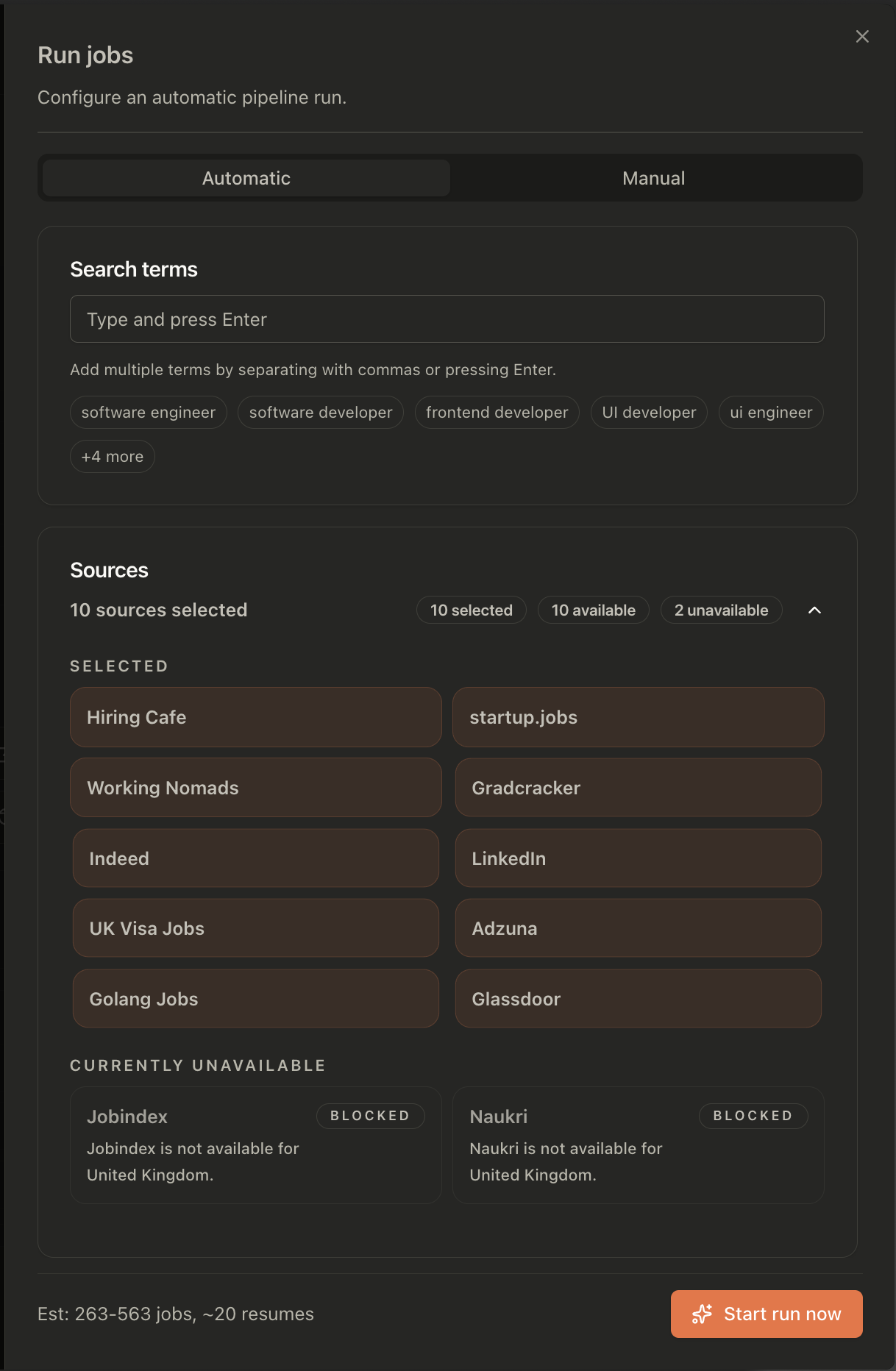
The source picker shows what is available for your setup and location. The example on this page includes Hiring Cafe, startup.jobs, Working Nomads, Gradcracker, Indeed, LinkedIn, UK Visa Jobs, Adzuna, Golang Jobs, and Glassdoor. Availability can change; a source shown here may be unavailable in your region or on a later run.
Search multiple job boards. Review one ranked list.
The same role can have five different titles. The right opening might be on a board you rarely check. Add your search terms, choose your sources, and let JobOps bring the results together.
Start with the work you want. Include the titles employers use.
A search for “frontend developer” will not necessarily return the same openings as “UI engineer”. Even when the work overlaps, employers use different titles, levels, and terminology.
Add a small set of terms that describe jobs you would seriously consider. Then select the sources worth checking for your location and field. JobOps runs those combinations and collects the results in your workspace.
The setup screen shows your terms, selected sources, and any unavailable sources before you start. You can see the scope of the run instead of trying to remember which searches you have already done.
Start narrow enough to recognise a good result. Adding every vaguely related title makes the review harder. Expand when you can name the opportunities your current terms are missing.
Four titles. Five sources. One setup.
Suppose you want a frontend role. You are open to jobs advertised as frontend developer, frontend engineer, UI engineer, or React developer. You also have five relevant sources to check.
Doing that manually means carrying the same list of titles through five websites, with each site’s own filters and saved searches. It is easy to skip a combination or rerun one you already checked.
4 × 5 = 20
Twenty term-and-source combinations. Configure the titles and sources together, then review the collected results. This is an example of search coverage, not a promise of twenty jobs or twenty unique matches.
Choose useful variations
Start with titles you see in suitable listings. Keep seniority in mind: “engineer” and “engineering manager” usually describe different searches.
Select relevant sources
Use the available general and specialist boards that serve your market. A remote-work board and a graduate board can add very different openings.
Adjust after reviewing
If a term returns mostly unsuitable jobs, make it more specific. If a title keeps appearing in good matches, include it in your next run.
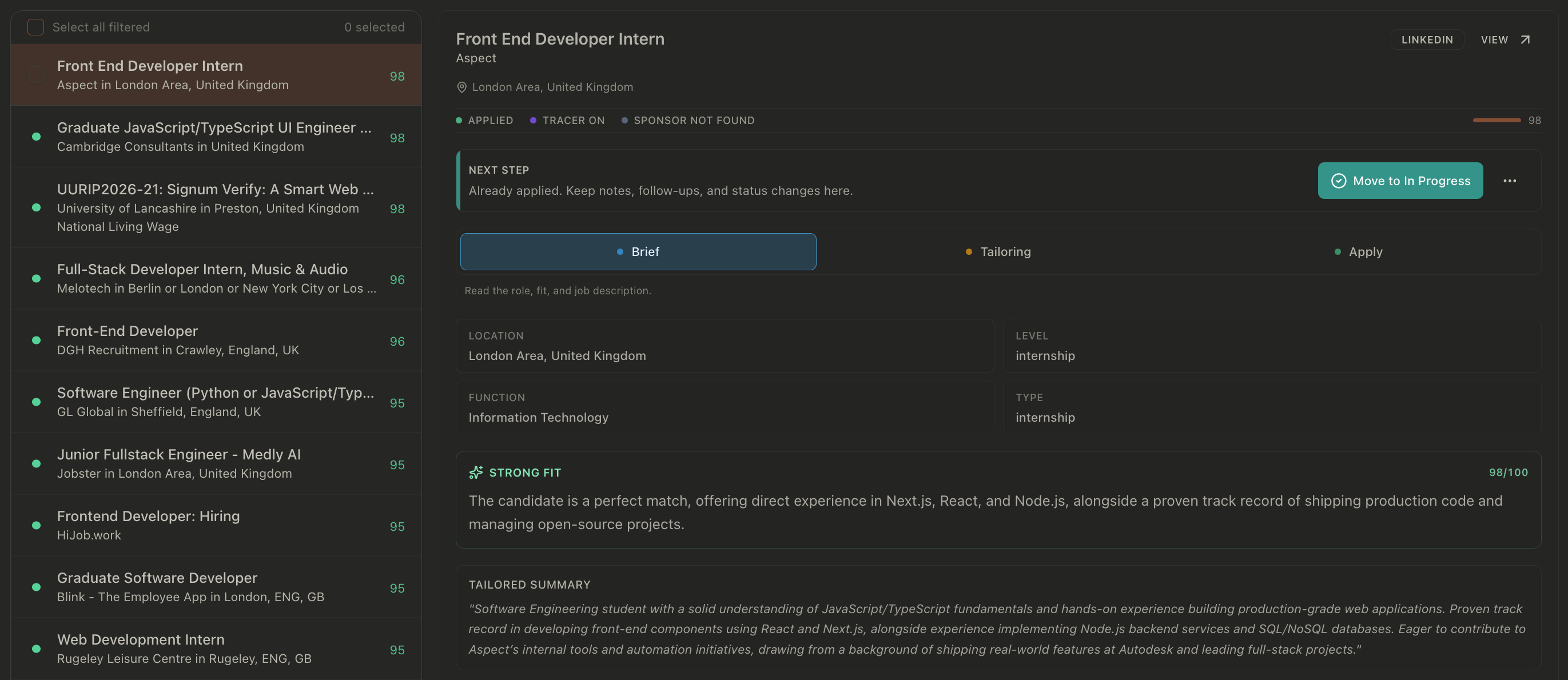
A long results list still needs a decision.
JobOps removes duplicate listings and scores roles against your profile so stronger matches can rise to the top. That gives you a starting order for review.
Open a role and read the assessment alongside its details. A matching title is only one part of the decision: the responsibilities, required experience, working arrangement, and location still need to make sense.
Two similar listings may also describe different openings. Check the employer and job description when the distinction matters rather than assuming every repeated title is the same vacancy.
Check these before you tailor
- Actual work: do the responsibilities match what you want to do?
- Experience: can you show evidence for the core requirements?
- Location: does remote include where you live, and is office attendance realistic?
- Eligibility: are work authorisation and sponsorship requirements clear?
- Current listing: is the opening still accepting applications on the employer’s site?
Once a role passes that review, tailor your resume to its requirements. Keep the rest of the list for triage rather than generating an application for every result.
Know what your search covers.
Job boards overlap, but none is a complete inventory of open positions. A specialist board can surface jobs a general board misses. A company careers page may publish a role before it appears elsewhere.
The source picker is the place to check availability for your run. The screenshot shows a UK setup with ten selected sources and two unavailable ones; it illustrates that setup, rather than a fixed source count for every user.
Keep a short list of employers and niche communities you want to check directly. Use the combined search to reduce repeated work across supported sources, and use those direct checks to cover the gaps.
When you find a promising role, give it a place in your application tracker. Discovery is useful when you can return to the opening and remember what you intended to do next.
FAQ
A few details before you start
No. JobOps searches the sources you select and can access. Employers may advertise only on their own websites, and boards can limit or delay access. Keep checking specialist sources and companies that matter to you.
A fit score helps prioritise your review. It is not an employer decision or proof of eligibility. Read the requirements and check location, work authorisation, seniority, salary, and any sponsorship conditions before you spend time on an application.
No. Searching collects and assesses roles. You choose which ones to pursue, review any application materials, and submit the application yourself.
Source availability depends on location, configuration, and whether that source can currently be accessed. The picker distinguishes selected, available, and unavailable sources so you can see what is included before starting a run.
Stop repeating the same search in another tab.
Put your titles and sources into one run, then spend your attention on the openings you would actually accept.
See plans for JobOpsPrefer to run it yourself? Self-host the open-source version.